Mireia Fernandez Cristia

Updated 2 months ago

Convert HD video and extract audio for free

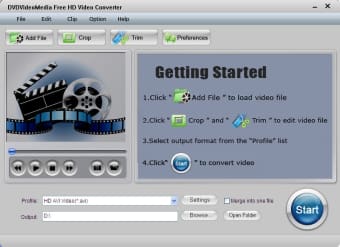
Free HD Video Converter is a multimedia and video software developed for the Windows operating system. Designed to convert SD and HD videos, Free HD Video Converter provides awesome video and sound output quality in a number of video file types, including MP4, MPEG, WMV, and MOV. For those looking to increase the quality of their existing video files, this software is a great way to make the most of your file and enhance it to its full potential, whether that is in standard or high definition.

Top Recommended Alternative

Fast and easy conversions

With the ability to convert HD video to all popular video formats, Free HD Video Converter can allow users to enable playability on a number of different devices. Some video players don’t support all file types, so it’s a solution that allows you to create universal files that play anywhere. Its functionality doesn’t stop there, though. HD Video Converter can also extract audio from both high definition and standard definition video and convert it to audio files with lossless. Whichever function you choose, you can rest assured that it will be done quickly, it will be easy, too.

Supports all files

Free HD Video Converter isn’t limited to one file type or format. In fact, it supports all popular file types, including WMV, MOV, MPEG, MP4 and more 1080p and 720p videos. With its wide range of formats, it can be used to convert almost all videos you may have. If you are looking for a similar program, we recommend you to download the same-named Free HD Video Converter.


Mireia Fernandez Cristia

Mireia Fernández has over a decade of experience as an editor, with a focus on software reviews, tutorials, and gaming guides. Her background in technology and long-standing passion for video games shape her clear and practical style when analyzing tools and trends.

  • Pros

    • Convert HD video to different formats
    • Extract audio from video
    • Completely free
  • Cons

    • Free to try
    • Not available for Mac
 0/1

App specs

Program available in other languages


User reviews about Free HD Video Converter

3.4

3 reviews

Add review

Main reviews for you

  • Anonymous user

    Free HD Video Converter really works well with my Windows 7. The converting speed it has is faster than all of the converting video I have tried. This software actually saved me many times especially when the deadline for my short film is fast-approaching. I think this is really a must-have, especially for film students or workers.

  • Anonymous user

    This is the best video converter out of the other converters that I have encountered so far. Its speed is simply the best plus it can even extract audio files which make it more amazing. I used this converter when I converted my short film into MP4 and the quality of my output got even better!


  • Anonymous user

    This software really works perfectly with my mac. The feature that I love the most in Free HD Video Converter is its ability to enhance my video to its full potential. It offers basic editing and optimization options. Moreover, I love that I can queue up multiple files in this software.

More

You may also like

Alternatives to Free HD Video Converter

Explore Apps

Latest articles

Laws concerning the use of this software vary from country to country. We do not encourage or condone the use of this program if it is in violation of these laws.
Softonic

Is Free HD Video Converter safe?

100/100

Score result: Clean

This file passed a comprehensive security scan using VirusTotal technology. It is safe to download.

  • Virus free
  • Spyware free
  • Malware free
  • Verified by Security Partners

    VirusTotal logo

Scan Info

Last scan
Wednesday, May 21, 2025
Scan provider
VirusTotal · Full report

File Integrity

File
Free_HD_Video_Converter_V2025.2.exe
SHA256
99f5a52035e78d273511b64974e045887d518e582ac29842b9a0cae3084d0af5
SHA1
b3da547653b4eec3ee3daacb6d9d91fb984b5988

Softonic security commitment

Free HD Video Converter has been thoroughly scanned by our advanced security systems and verified by industry-leading partners. This file comes from the official developer and has passed all our security checks, showing no signs of viruses, malware, or spyware. For more information, visit our Security and Trust Center